




Understands what you’re looking at
It knows which page each visitor is on, so “how much is this?” gets an answer.
 OX·IA
Free demo with your own website
OX·IA reads your website and creates an assistant that answers with your information, linking to the exact paragraph each fact comes from. Try it here, by typing or talking, before you decide anything.
It’s a demo: you try it here, on your website, and install it once you activate your account. Want to start straight away? Create your account
An assistant that makes up a price loses you customers. OX·IA only answers with what’s on your website, and every fact carries its number: that number opens your page with the sentence highlighted.
It isn’t a form dressed up as a chat. It’s like someone on your team who has read your whole website.
It knows which page each visitor is on, so “how much is this?” gets an answer.
It lets you know and you pick up in the same chat, during your opening hours.
Using the slots that are actually free in your calendar: Google Calendar, Outlook or your WordPress plugin.
What people ask that your website doesn’t answer, grouped by topic. You teach it the answer in one click.
What your website doesn’t answer · this week, 33 questions
Anyone asking for a quote leaves their details in the chat, with their consent. You get them straight away.
With your talking points for “it’s too expensive” or “I’ll think about it”, adapted to each conversation.
Your colour, your icon, its name and its personality. Formal or casual.
It answers in the visitor’s language, even if your website is only in one.
Each assistant has its own message limit, which you set. Anyone abusing the chat gets slowed down automatically, or you block them in one click.
A discreet bubble with your colour and your icon. A clinic, a grill house, an accountancy firm, a shop, a tutoring centre: each with its own assistant.
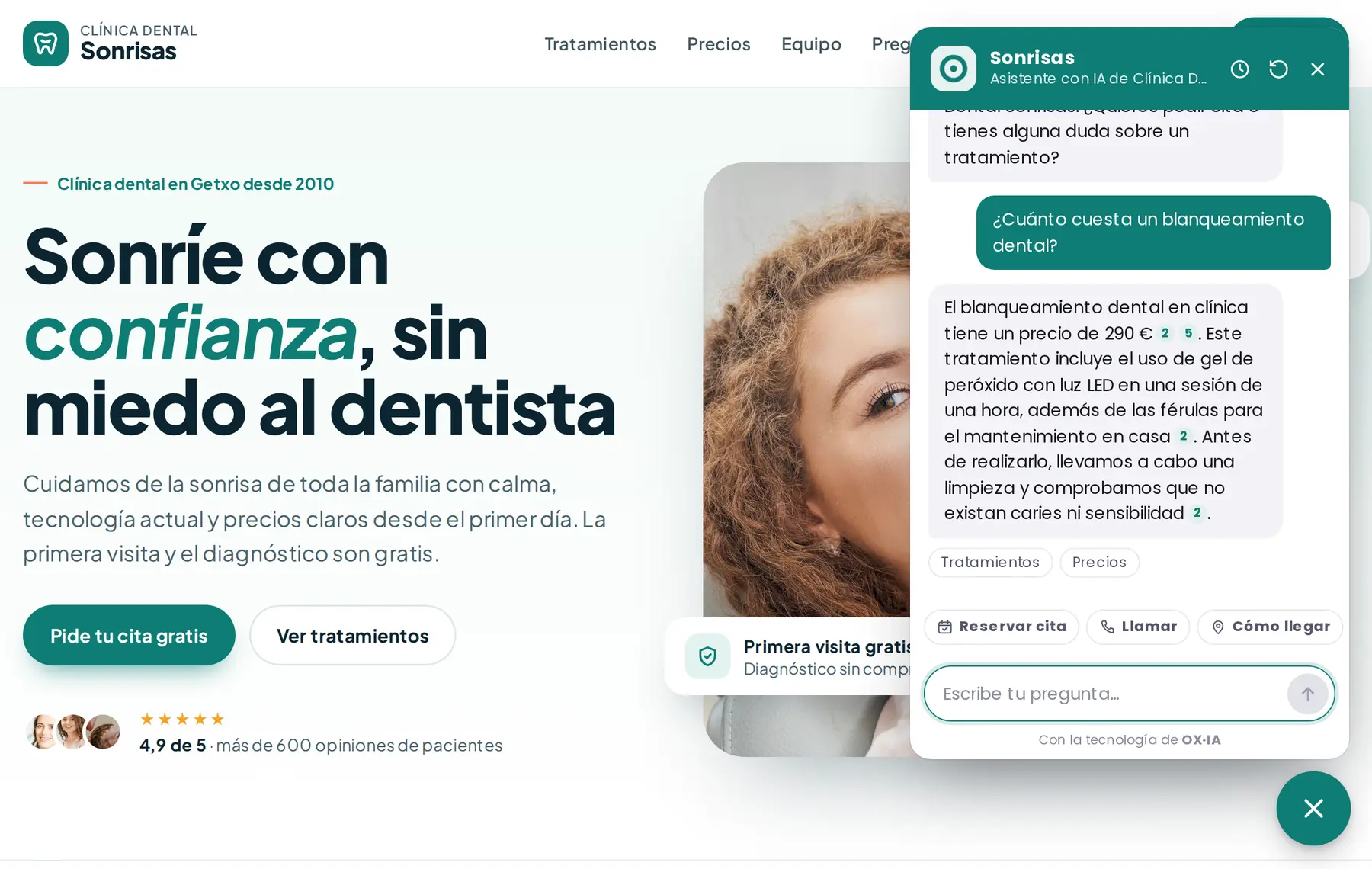
Real screenshot · a dental clinic’s test website
Under the hood
It finds your pages, starts with what people ask about most (services, prices, contact) and picks up your logo, your colours and your tone.
For each question it searches your content and writes using only that. Every fact carries its number; if something isn’t there, it says so.
Every night it learns what has changed on your website. With the WordPress plugin, straight away.
Monthly or yearly, with two months free. Change plan or cancel whenever you like from the dashboard.
Your website, answering 24 hours a day.
€29a month + VAT
Includes:
Several websites and a bigger team.
€79a month + VAT
Everything in Bit, plus:
Everything, for teams with lots of websites.
€199a month + VAT
Everything in Core, plus:
With the Agency plan, each client has their own assistant and their own access to the dashboard. Everything in Quantum with 10 assistants for €199 a month + VAT, and it grows with no cap: each extra assistant is €18. Scale it up whenever you like from your dashboard.
For agencies and freelancers
Offer each client their own AI assistant, under your brand and with their own access to the dashboard. You set the price; we send you a single invoice.
See the Agency planYou charge €780 · your Agency plan, €379 + VAT (10 assistants included, €18 for each extra one).
You enter your website address and OX·IA reads it live: in one to three minutes, depending on its size, your assistant is answering with your information, in writing and by voice. It’s free for 7 days or 200 messages, no card needed, and includes everything in the Bit plan; only the limits change: the messages, the pages it learns (40) and the voice minutes (5).
No. The demo only works on its own OX·IA page, so you can try it without touching anything. To put it on your website, you activate your account: it keeps everything it has learnt, and you install it with one line of code or, on WordPress, with the plugin. Bookings, connections (WhatsApp, Telegram, email) and everything else are set up from the dashboard.
It’s an assistant that answers your website visitors in writing, at any hour, and understands what they ask in their own words. A button-based or rule-based chatbot follows a script; this one looks for the answer in your business’s information and explains it. OX·IA builds it from your own website.
ChatGPT knows a bit about everything and nothing about your business. OX·IA only answers with what’s on your website and what you teach it, cites the source of every fact, presents itself with your branding, collects contacts, books appointments and hands the conversation to your team when needed.
Before writing, it searches your content for the passages that answer the question, and it can only use those. Every fact carries a number that links to the page and highlights the sentence it comes from. If it finds nothing, it says so, offers your contact details and logs the question in your dashboard.
By pasting one line of code before the end of the page, on any website: WordPress, Shopify, Wix, Squarespace, Webflow, PrestaShop or hand-coded. On WordPress you can also use our free plugin, which installs it without touching any code and teaches it every page you publish.
It’s yours. We comply with the GDPR, the servers are in Spain, the data isn’t used to train any AI and the chat doesn’t set cookies on your website. Your account can be protected with two-step verification.
From €29 a month + VAT on the Bit plan; Core is €79 and Quantum €199. Paying yearly, you pay for 10 months. There’s no minimum term, and you can try it free with your website for 7 days or 200 messages, no card needed.
Create your account and have your assistant up and running today.
What we learn from putting AI assistants to work on real websites.

Plenty of AI ideas sound good and earn little. We go through the usual ones and pick one that works without knowing how to code.
Read the article →
Why an AI sometimes makes things up, and how to build a chatbot that only answers with what it can back up.
Read the article →
Privacy, mistakes, dependence, a cold service. The reasonable concerns about AI in a business, one by one and without scaremongering.
Read the article →
What a chatbot does well, what it can’t do and why, in most businesses, it ends up being reception’s best ally.
Read the article →
The GDPR, the EU-US Data Privacy Framework and the AI Act without the jargon: what to ask before you put a chatbot on your website.
Read the article →
What separates a chatbot that helps from one that gets in the way is rarely the technology. It’s how you set it up. Five tips that work.
Read the article →
Your website gets questions at all hours, including when there’s nobody around to answer. This is what changes when someone does.
Read the article →Give us a call and we’ll talk you through it, no strings attached.